A new client has signed. That's the good part. Then the list starts: create a folder, add the client to the accounting software, write a welcome email, send an intake form, book the kick-off, tell the team. It goes slightly differently each time, because a different person does it each time. Now and then a step gets lost, and the client is still waiting for the intake form three weeks after signing.
This article is about onboarding new clients in a service business, such as an agency or a consultancy. I'll show which steps you can automate, which ones to keep personal, and how to set it up without turning it into a big project.
Start at the moment of yes
Every onboarding has a starting point. For most service businesses that is the signed quote or contract. Make that moment clear, because everything after it depends on it.
There may be several starting points today. One colleague starts when the “go ahead” email arrives, another waits for the signed PDF, a third waits until the first invoice is paid. Choose one. For example: the deal in your CRM moves to “won”. Or: the quote in your accounting software is accepted.
That single moment becomes the trigger for the automation. Without a fixed trigger, there is little to automate.
Write down what happens now
Take the last three clients you brought on and write down what happened after they signed. Who did what, in which system, and how long did it take? You'll quickly see where it differs and where it gets stuck.
For an eight-person agency, that list might look like this (an example):
- Add the client to the accounting software
- Create a project folder in Google Drive or SharePoint
- Create a project or board in the project tool
- Send a welcome email explaining what happens next
- Send the intake form
- Book the kick-off call
- Tell the team who the client is and who does what
- Send the first invoice or deposit request
First look for steps you can drop or merge. Does the intake form need to be separate, or can it go in the welcome email? Did the client already give you details during the quote stage that you are now asking for again? Every question you don't ask twice is one step less for you and for the client.
What the system does, and what stays personal
My rule of thumb: the system does the setting up, a person does the contact.
Good to automate:
- Adding the client to the accounting software with the details from the CRM, so nobody retypes them.
- Creating a project folder with a fixed structure from a template.
- Creating a project or board in monday.com, ClickUp or Notion, with the standard tasks already filled in and assigned.
- Sending the intake form and putting the answers in the project or the CRM.
- Sending a reminder if the form is still empty after a few days.
- Posting a message to the team, in Slack or by email, with the key details.
Keep personal:
- The first message from the person who will work with the client. An automatic welcome email is fine, but send it in that person's name, with a few lines you adjust for each client.
- The kick-off call itself.
- The moment you agree together what a good result looks like.
A client who has just signed wants to feel they are dealing with people. When the system creates the folders, those people have time for that conversation.
The whole flow in one example
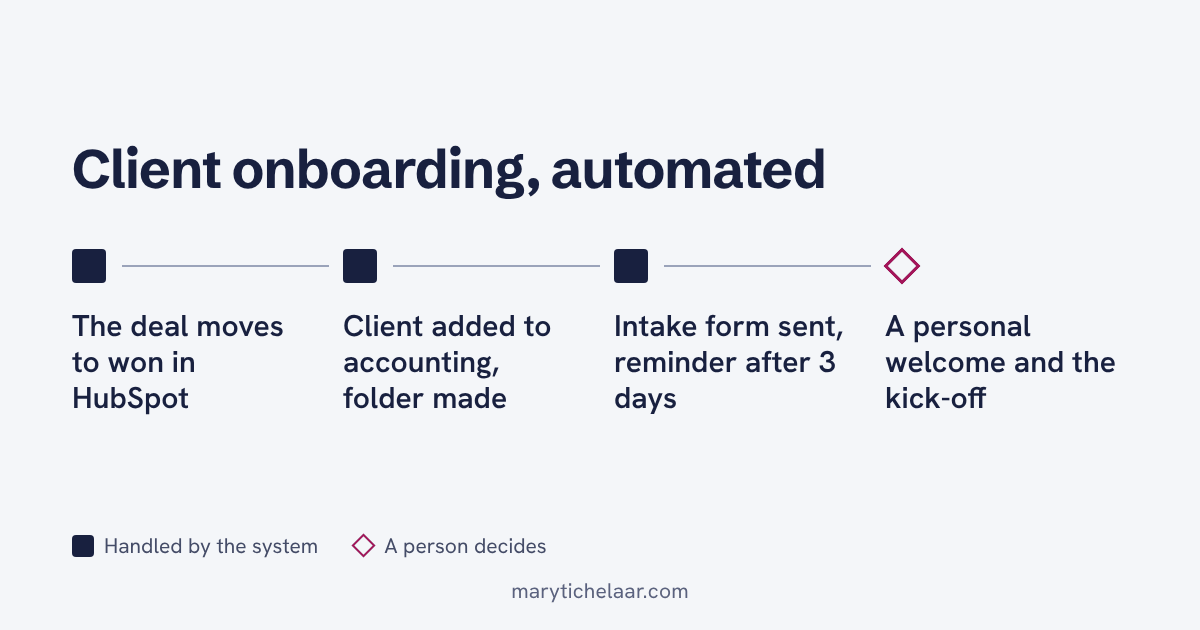
This is how it can look for a team that works in HubSpot and monday.com. With other tools the idea is the same.
- The deal in HubSpot moves to “won”.
- Zapier or n8n adds the client to the accounting software and creates a folder in Drive.
- A new item appears in monday.com with the fixed onboarding tasks, assigned to the right people.
- The client receives the intake form. The answers are added to the item in monday.com.
- After three working days without an answer, a friendly reminder goes out.
- The account manager gets a task: send a personal welcome email and book the kick-off.
Step 6 is a task for a person on purpose, with all the information ready. That is where a person decides.
The same idea is behind the sign-up page I built for a client: every sign-up gets a confirmation straight away and lands in HubSpot, the team gets an email, and they follow up personally. See the sign-up page that does its own follow-up.
Collect only the data you need
An intake form easily asks for more than you need. Ask only for what the work requires, and make sure the answers end up where only the right people can see them. If you handle personal data, for example about contact people at the client, data protection rules such as the GDPR apply to your forms and automations too. The UK regulator, the ICO, has a plain step-by-step guide for small organisations.
When not to automate it
- You take on a few new clients a year. A good checklist in your project tool is enough. A checklist is a way of writing it down, too.
- Every client gets a different approach. If there are no fixed steps, automate only the part that is always the same, such as adding the client to your accounting software.
- Nobody keeps the CRM up to date. If the deal status is wrong, your flow starts at the wrong moment, or never. Make the trigger reliable first.
Write it down
Describe on one page what the flow does, which system does what, and what to do when something doesn't happen. Add who owns it. When a new colleague asks in six months why every client gets a folder automatically, the answer is somewhere.
Frequently asked questions
What is client onboarding?
Client onboarding is everything between the moment a client says yes and the moment the work itself starts: recording their details, agreeing how you'll work, arranging access and meeting the team.
Which tools do I need to automate client onboarding?
Usually what you already have: a CRM or accounting tool for the trigger, a project tool for the tasks, and a connection such as Zapier or n8n in between. Most of these tools have a form builder for the intake built in.
How long does it take to build an onboarding flow?
For a simple flow with fixed steps, the building is usually the smallest part. Most of the time goes into agreeing on the steps and the trigger.
Won't automated onboarding feel impersonal?
Only if you automate the contact. Automate the setting up, and spend the time it saves on the first conversation with the client.
Want your next client's start to go right the first time? Book a get-to-know call. We look at your current steps and where they get stuck. Or get one practical tip a week in The Monday note.