You sent a good quote. The client sounded keen on the call. Then nothing. After two weeks you think of it, after three weeks calling feels awkward, and after a month the quote still says “sent” in your system. Or you've forgotten it altogether.
That is rarely about effort. Following up is a task without a fixed moment, and tasks like that slide. A simple follow-up routine gives every quote that moment. Here is how to set it up with tools you probably already have, and why the most important contact stays with a person.
Why quotes get left
A quote usually goes quiet for one of these reasons:
- Nobody owns it. The owner sent the quote, but a colleague had the contact. Each thinks the other will call.
- There is no overview. Quotes sit in the accounting tool, in a folder or in someone's sent items. Nobody can see at a glance which ones are open.
- Following up feels pushy. So you wait for the client to get in touch.
The last one is solved by a shift in how you see it: following up is part of the service. The client may be busy, and then a reminder helps.
Step 1: give every quote a status
You can only follow up on what you can see. Choose one place where every quote lives, with a status. That can be:
- Your CRM, such as HubSpot or Pipedrive, with the quote as a deal in a “quote sent” stage.
- Your accounting tool, if it sends your quotes. Many of those track a status such as sent, accepted or declined.
- A shared sheet, if you send only a few quotes a month. One column for the date sent and one for the status is enough.
Pick one. If quotes live in two places, sooner or later one of them is wrong.
Step 2: agree on a fixed rhythm
Decide how long you wait before following up, and what happens then. A rhythm to start with (adjust it to your own clients):
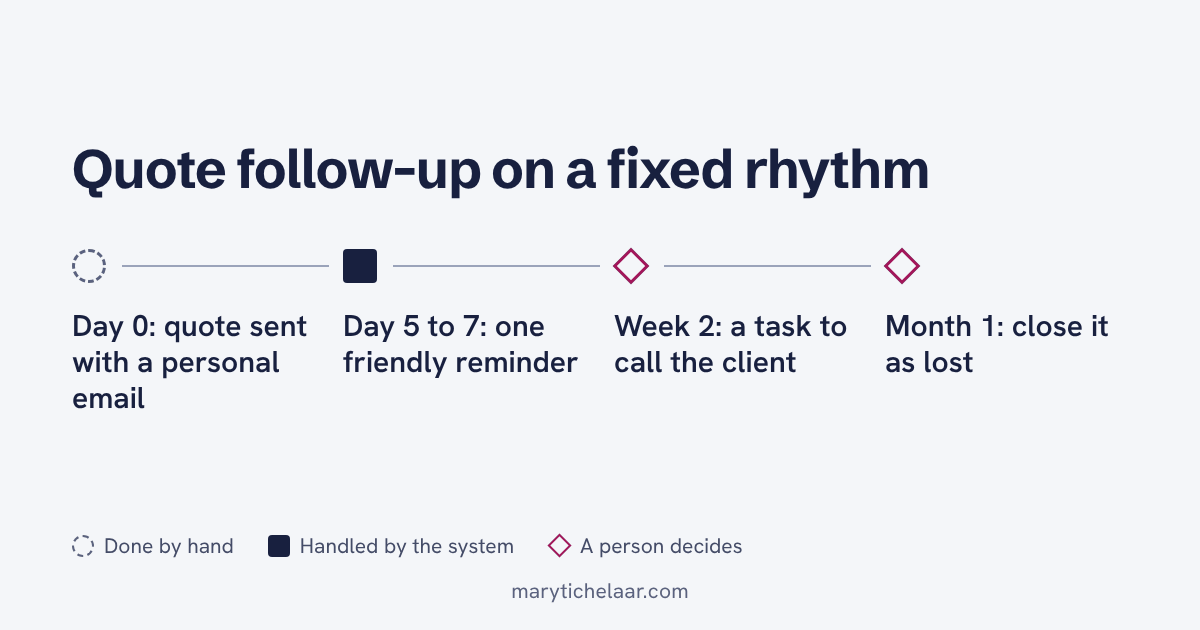
- Day 0: quote sent, with a short personal email saying what the next step is.
- After five to seven working days: one automatic, friendly reminder. Short, from the person who sent the quote, asking whether there are any questions.
- After two weeks: a task for a person: call.
- After a month: if there is still nothing, close the quote as lost, with a short email saying you're closing it and that the client is welcome to come back.
That closing email gives the client an easy moment to reply after all.
Step 3: automate the reminder and the task
What you automate here is the remembering. The system keeps track of when each quote went out and starts something at the right moment.
- In HubSpot, depending on your plan, a workflow can start when a deal enters the “quote sent” stage. After a set number of days it sends an email or gives the deal owner a task. Workflows are not in the free plan; there, a task with a due date does the job. Check HubSpot's pricing page for which plan includes which workflows.
- With an accounting tool that has a Zapier app, a new quote can create a task in your project tool or calendar, with the right date.
- With a sheet, Google Apps Script can check every morning which quotes are older than seven days and still open, and email that list to the owner.
The sheet is the simplest of the three, and for a team that sends ten quotes a month it is often enough. No extra subscription, and everyone understands how it works.
Step 4: keep the call personal
The automatic reminder is a safety net. The conversation is where you win the work. That is why step 3 of the rhythm is a task for a person.
The sign-up page I built for a client works the same way. Every sign-up goes into HubSpot automatically and the team gets an email. Anyone who starts the form but doesn't finish it gets a friendly email. The follow-up itself is done personally by the team, with everything in one place. See the sign-up page that does its own follow-up.
A quick sum
Say you send 20 quotes a month, and without a fixed routine a quarter of them never get a follow-up call. That is five quotes a month where you don't know why nothing came of it. If following up wins back one of those five, that is one extra job a month. These numbers are made up. Do the sum with your own volumes and your average job value: what would even one extra job a quarter be worth?
What not to automate
- A sequence of five automatic emails. After the second reminder it reads like a newsletter nobody signed up for.
- Follow-up on large or sensitive quotes. Call, or write the email yourself.
- A reminder without an owner. If it comes from “info@”, it doesn't feel like a question from a person.
Write it down
Put the rhythm on one page, with who owns which quote and what the system does. Once a month, look at the quotes you closed as lost: why didn't they go ahead? You learn more from those than from the ones you won.
If you also want to see how much work moves through each stage and where it stalls, an overview of the whole pipeline helps. See the pipeline dashboard.
Frequently asked questions
When should I follow up on a quote?
Five to seven working days after sending is a good starting point, with a short reminder. Call if you've heard nothing after two weeks. Say when you'll be in touch when you send the quote, so the client expects it.
How do I follow up on a quote without being pushy?
Keep it short, personal and specific. Ask whether there are questions, or offer to explain a part. After a fixed period, close it with a friendly email. A clear end feels less pushy than chasing.
Can I automate quote follow-up on HubSpot's free plan?
Partly. You can use deals and tasks with due dates. Workflows are not in the free plan. For a small number of quotes, one task per deal is often enough.
Do I need a CRM to follow up on quotes?
No. If you send a handful of quotes a month, a shared sheet with a daily email from Google Apps Script works. A CRM helps once more people send quotes or the numbers grow.
Want no quote to be forgotten again? Book a get-to-know call. We look at where your quotes are now and the simplest rhythm that fits your team. Or get one practical tip a week in The Monday note.