If you want to know whether automating your invoice check is worth it at all, start with my article on how to automate invoice checking. This one is for the next question: what does such a system look like inside?
Below is the build I made for a client, a B2B service company, step by step. It runs on Google Apps Script, Google Sheets, Gmail, Slack and Claude. It checks invoices from suppliers and the invoices the company sends itself, and the manual part now takes about 10% of the time the full check used to take.
The starting point
Every month, someone built a list by hand of the invoices that should come in, based on the work that was running. Then they checked each invoice against that list, line by line, for incoming and outgoing invoices. It took hours, things slipped through, and it was hard to see whether the amounts matched what was expected.
Step 1: decide what the source of truth is
Before building anything, one question needed an answer: where does it say what we expect this month? Here, it was a sheet of running work. That sheet generates the list of expected invoices every month.
If you don't have such a list, that is the place to start, not the script. Without something to compare against, there is nothing to check.
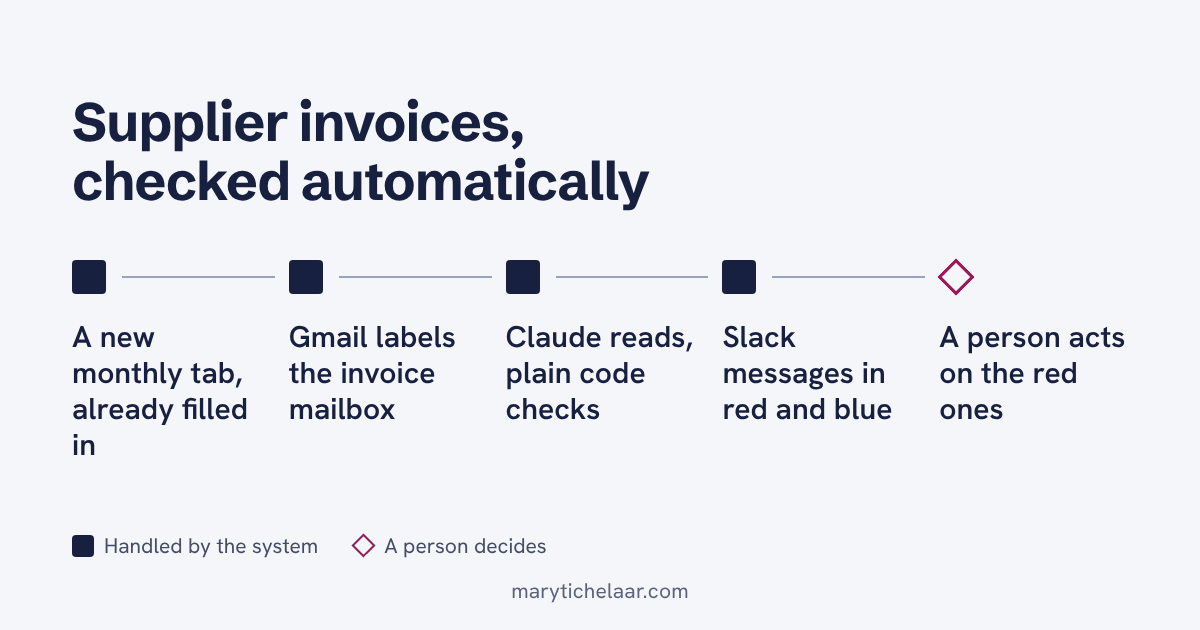
Step 2: a new monthly tab, already filled in
On the 1st of each month at 07:00, the script creates a new monthly tab in the payments spreadsheet, built from the source sheet. The expected invoices are listed before they arrive. Anyone who opens the sheet sees straight away what is still missing.
Step 3: one mailbox, labelled by Gmail
All invoices arrive in a shared invoice mailbox. Gmail filters label them as they come in. The script runs under that mailbox's own account, so it can use Gmail, Google Drive and Google Sheets without any extra authorisation.
The script looks for those labels and adds its own status labels as it works. One lesson here: watch out for labels that look alike. Two similar labels once made some emails invisible to the script.
Step 4: Claude reads, plain code checks
Every 4 hours the main run picks up new invoice emails. Each PDF goes to the Claude API, and Claude works out:
- whether it is an original invoice or something else, such as a reminder or a receipt confirmation
- which direction it goes: an invoice the company received, or one it sent
- which of the company's legal entities it is for
That last one uses the company registration number (the KvK number in the Netherlands), not the address, because two of the entities share an address.
What Claude reads goes into the payments spreadsheet. Matching it against the expected invoices is done by plain code with fixed rules. That split is deliberate: AI is good at reading messy PDFs, fixed rules are better at the bookkeeping logic, and a person is best at the exceptions.
Step 5: a queue with reasons, not a silent drop
A line that matches nothing doesn't disappear. It goes to a queue tab with the reason it didn't match. Every 6 hours the script tries the queue again, so when someone fixes the spelling of a name, the invoice lands in the right place by itself. An aliases tab maps different spellings of the same name to one.
A log tab records every PDF that was read, what was extracted and where it went. When someone asks why an invoice ended up somewhere, the answer is there.
Step 6: forwarding and a weekly rate check
Invoices are forwarded by email to the bookkeeping software, and the script tracks the confirmations. Once a week, a separate check compares the rates and VAT on each line with what was agreed, and flags anything that deviates.
Step 7: Slack, in red and blue
Everything a person has to act on goes to Slack:
- Red means someone has to do something: an invoice that fits nowhere, a rate that deviates, a send that failed.
- Blue is for information.
Messages are bundled into one thread per day, so the channel reads like a short to-do list instead of dozens of separate alerts.
Step 8: the schedule, and a heartbeat
Fifteen scheduled triggers keep it running. Some of them:
- the main scan every 4 hours, and the queue every 6 hours
- the new monthly tab on the 1st at 07:00
- a weekly overview on Monday of everything still open
- a monthly check on the 10th comparing what was expected with what was booked; by then most of the previous month is in, so “still zero” is a real signal
- a follow-up scan that looks back 14 days for credit notes that arrived as email replies
- a heartbeat every Friday that warns if the last scan was more than 12 hours ago
The heartbeat matters more than it looks. A script that stops makes no noise. Making silence visible means “no alerts” can never quietly mean “broken”.
A lock (LockService in Apps Script) stops two runs from booking the same invoice twice.
Step 9: keep the keys out of the code
There are no keys in the code. The Claude API key and the Slack token live in Script Properties, so the code can sit in a GitHub repository safely. GitHub is a copy, though, not the source: changes made in the Apps Script editor have to be copied over by hand. Write that down for whoever maintains it next.
What stays with a person
Someone picks up the red Slack messages every day, and reviews the Monday overview and the monthly check. That is the part that now takes about 10% of the old time. More on the project on the monthly invoice checks page.
What I'd tell you before you build this
- Start with the core. If you build something similar, begin with the expected list, the reading step and the queue, and add the heartbeat early. Fifteen triggers is not a requirement.
- Your accounting software may already do part of it. Many tools read invoices and match them to payments. Check that first, and ask your bookkeeper what they already check.
- A handful of invoices a month doesn't need this. A checklist is faster.
Frequently asked questions
Can Google Apps Script read invoice PDFs?
In this build, Apps Script doesn't read them itself. It collects the PDFs from Gmail and sends them to the Claude API, which reads them. Apps Script then handles the rules, the sheet and the messages.
Why use Claude for reading and not for checking?
Reading a PDF that every supplier formats differently is where AI helps. Checking whether an amount matches the agreement is a fixed rule, and fixed rules are easier to test and explain. A person reviews whatever doesn't fit.
Does this work for invoices we send as well?
Yes. Claude marks the direction of each invoice, and the expected list covers both sides. An expected invoice that is missing is a signal on either side.
What happens when the script stops?
The Friday heartbeat warns in Slack if the last scan was more than 12 hours ago. The lock stops double bookings if two runs overlap, and the queue keeps anything that didn't fit, so nothing is lost while it is fixed.
Does your monthly check look like the starting point above? Book a get-to-know call and we'll look at what a build like this would need in your business. Or get one practical tip a week in The Monday note.